




- New Features & Enhancements
- Full Update Notes
Simul8 Features & Enhancements
Simul8 33.3.0
Feature: Share simulation results with Minitab Dashboards
User Benefit
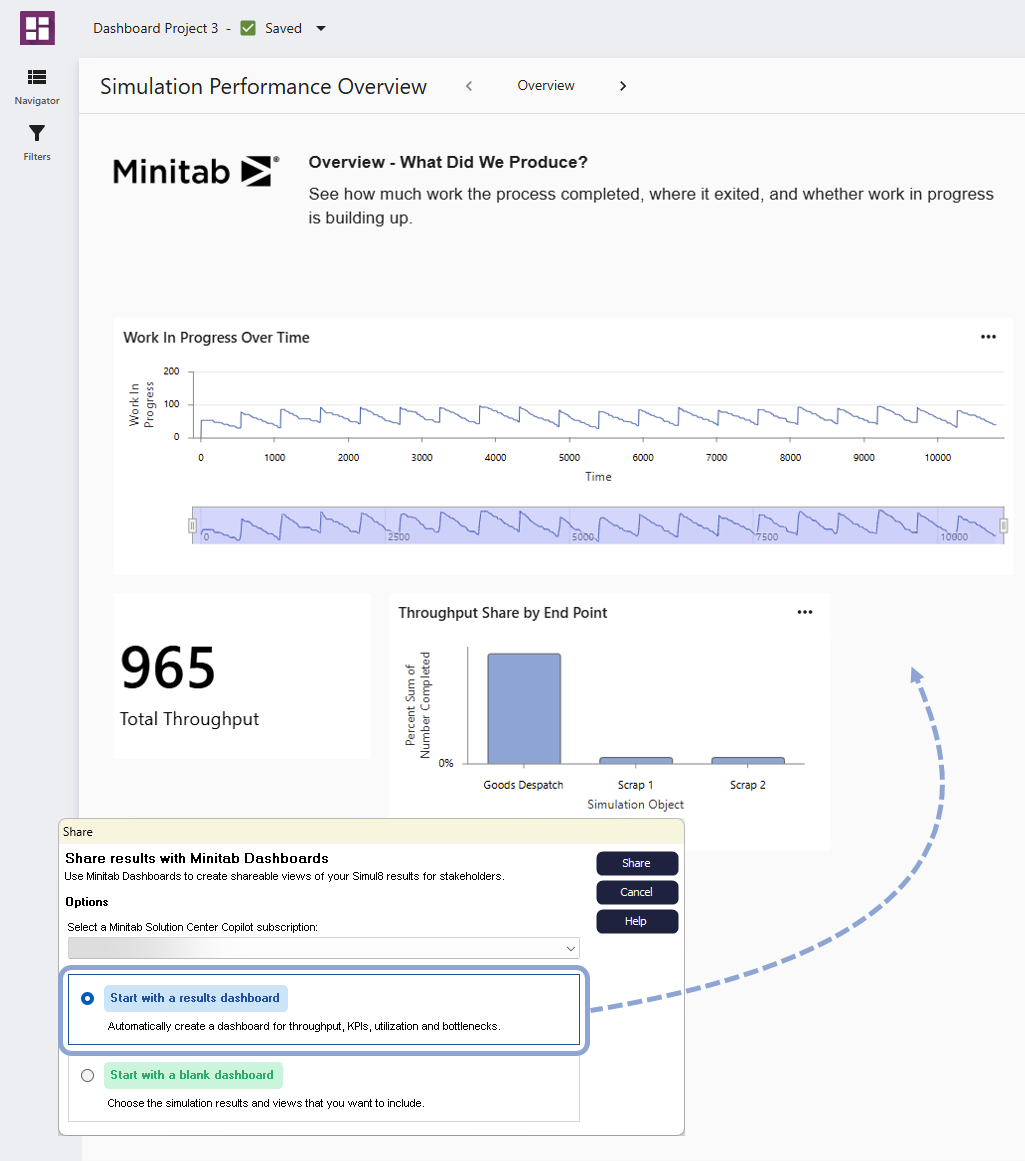
Create a simulation in Minitab Simul8, then use the new Share workflow to share the results with Minitab Dashboards. Automatically generate an interactive dashboard or start with a blank canvas and build your own by dragging and dropping available assets.
Whether you automatically generate a dashboard or build your own, you can use all the features, assets, and controls in Minitab Dashboards. Continue to customize your dashboard and explore your results. Share your dashboard to communicate findings, collect feedback, and let stakeholders update simulation scenarios and input data.
Summary
Create a simulation in Minitab Simul8, then share the results with Minitab Dashboards. Automatically generate an interactive dashboard or build your own. Customize and share your dashboard to communicate findings, collect feedback, and let stakeholders update simulation scenarios and input data.
Simul8 25 March 2026
Feature: Quick Build — A faster path from process to simulation
User Benefit
Quick Build lets you create simulations by entering process details into four clear, structured tables instead of drawing flowcharts or writing logic. Define arrivals, activities, routing, and resources, and Minitab Simul8 automatically generates a working model. This streamlined approach makes it easier to get started while guiding you through the core elements of a simulation as you build.
Summary
Create simulations using just four tables of data and then let Minitab Simul8 automatically generate the model. Quick Build simplifies setup while guiding you through the core elements of a simulation.
Feature: Guided templates — Step-by-step manufacturing simulation
User Benefit
Use the new guided templates in Minitab Simul8 to run simulations based on realistic production scenarios. Each template walks you through a clear modeling approach—from defining the process to interpreting results—so you can evaluate bottlenecks, capacity constraints, investments, staffing changes, and quality improvements with confidence.
Summary
Minitab Simul8 now includes a set of guided simulation templates designed to help teams model real-world manufacturing processes and evaluate improvement. Built-in guidance ensures results are easy to interpret and actionable.
Simul8 4 February 2026
Minitab License Portal Licensing for Simul8
User Benefit
Simul8 licensing is now managed through the Minitab License Portal, giving customers more streamlined access to their software and license management.
Simul8 users benefit from single sign-on and simplified account access. Administrators can manage Simul8 alongside other Minitab products in a single, centralized location, improving visibility and reducing license management overhead.
This change aligns Simul8 with Minitab’s standard licensing and authorization experience and streamlines support for growing teams and broader tool adoption.
Summary
Simul8 licenses are now managed in the Minitab License Portal.
This change enables:
- Single sign-on for Simul8 users
- Centralized Simul8 license management through the Minitab License Portal
- Visibility of Simul8 licensing alongside other Minitab products
Simul8 Full Update Notes
Simul8 33.3.0
Release Date: 28 October 2026
New Features
Share simulation results with Minitab Dashboards
Create a simulation in Minitab Simul8, then share the results with Minitab Dashboards. Automatically generate an interactive dashboard or build your own. Customize and share your dashboard to communicate findings, collect feedback, and let stakeholders update simulation scenarios and input data.
Problems Resolved
The following issues are resolved in Minitab Simul8 33.3.
- Scenario manager trials now run as expected when the routing arrow density feature is enabled. (396966)
- Improved performance when exporting excessively large models to PDF. (386788)
- Resolved an issue that could cause an unexpected error after repeatedly moving a routing arrow handle. (387175)
- Object results graphs and on-screen charts now appear in the Simul8 Educational version. (370093/391667)
- Fixed an issue that could cause a simulation error when work item completion times changed within an activity after a breakdown and repair. (391745)
Known Problems and Workarounds
Minitab Simul8 33.3 has the following known issue.
- Commas in object names are incorrectly treated as column delimiters when transaction log CSV files are loaded into a spreadsheet. (373236)
WORKAROUND: Before creating a transaction log, remove commas from object names or replace them with a different character, such as an underscore.
Simul8 33.2.2
Release Date: 24 June 2026
New Features in Minitab Simul8
Minitab Simul8® guidance is now available from the Minitab Solution Center
Minitab Simul8® Support is now available through the Minitab Solution Center Support site. Find the same trusted guidance in a refreshed experience with improved organization, easier navigation, and clearer categorization.
Problems Resolved in Minitab Simul8
The following issues are resolved in Minitab Simul8.
- Object memos no longer appear incorrectly under the On Breakdown column in the Input Summary for activities. (31713)
- On the Conveyor graphics tab, the options to rotate, flip, and mirror conveyor graphics now apply the expected changes. (31720)
- Resource utilization results are now reported correctly when Scheduled Maintenance is used. Previously, utilization results could appear incorrectly in charts, transaction logs, or Visual Logic (33416)
- Label-based timing now works correctly when an activity uses a Log Normal distribution. Previously, the activity timing could be set to one time unit instead of using the distribution parameters. (32381)
- When importing a process map from Minitab Workspace, Simul8 now displays a message if there is an issue with the file. (30887)
- Improved the GitHub SSH connection experience by eliminating the need to use command-line controls and providing clearer, more detailed messages when connection errors occur. (36369)
Simul8 33.2.1
Release Date: 20 May 2026
This release contains important maintenance updates.
Simul8 25 March 2026
Release Date: 25 March 2026
New Features in Minitab Simul8 March 2026
Quick Build — A faster path from process to simulation
Create simulations using just four tables of data and then let Simul8 automatically generate the model. Quick Build simplifies setup while guiding you through the core elements of a simulation.
Guided templates — Step-by-step manufacturing simulation
Minitab Simul8 now includes a set of guided simulation templates designed to help teams model real-world manufacturing processes and evaluate improvement. Built-in guidance ensures results are easy to interpret and actionable.
Problems Resolved in Minitab Simlu8 March 2026
The following issues are resolved in Minitab Simul8 March 2026.
- Simul8 projects will not open a blank project from Windows Explorer, but will open using File > Open within Simul8. (326031)
- Preference Help dialog is not contextual. (317027)
- Resource Traveling percentage is not showing as percentage on the Results Summary. (317007)
Simul8 4 February 2026
Release Date: 4 February 2026
New Features in Minitab Simlu8® February 4, 2026
Simul8 licensing is now managed through the Minitab License Portal, giving customers a more streamlined way to administer access.
This update enables:
- Single sign-on for Simul8 users
- Centralized Simul8 license management through the Minitab License Portal
- Visibility of Simul8 licensing alongside other Minitab products